


.png)


.png)


AI-Powered Key Takeaways


Table of Contents

A test fails. You go looking for what broke, a new commit, a config change, or a dependency bump, and find nothing. You rerun the exact same test against the exact same code, and it passes. Run it a few more times over the week, and it fails again, seemingly at random.
That's a flaky test: one that produces different results, pass, then fail, then pass again, without any change to the code or the test itself. It's one of the most common problems in automated testing, and one of the most corrosive, because it doesn't just cost time. It teaches your team to stop trusting your test suite.
This guide covers what a flaky test actually is, why it deserves more attention than most teams give it, the root causes behind most flaky test automation failures, and the fixes that hold up over the long run.
What Is a Flaky Test?
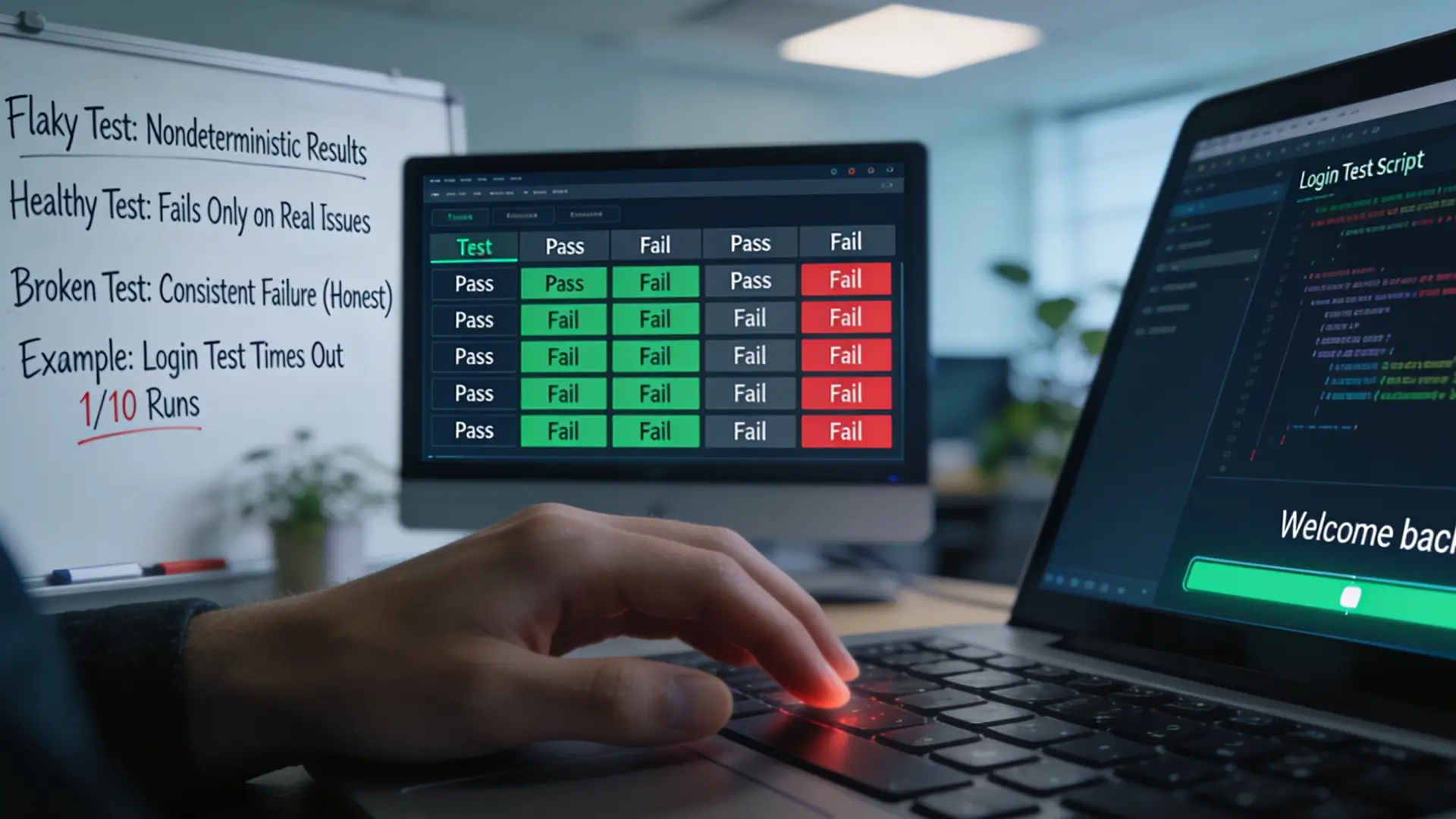
A flaky test is an automated test case that returns inconsistent results, such as passing in one run and failing in another, even though nothing about the underlying application or the test code has changed in between.
The keyword is nondeterministic. A healthy test should fail only when there's a real problem with the software and pass only when there isn't. A flaky test breaks that contract: it fails, or passes, for reasons that have nothing to do with whether the feature it's checking actually works.
That's different from a test that's simply broken. A consistently failing test is annoying, but it's honest, it fails every time, for the same reason, and points you toward a real bug or an outdated assertion. A flaky test case is harder to deal with precisely because it's inconsistent. The result alone doesn't tell you whether it just caught a genuine regression or whether it's misbehaving again.
Here's a common example. A login test enters valid credentials and waits for a "Welcome back" screen to appear. Nine times out of ten, the screen loads well within the test's wait window, and the test passes. On the tenth run, the backend takes a fraction of a second longer to respond, maybe the server is under slightly more load, maybe the network hiccups, and the test times out before the screen appears. Nothing in the application broke. The test simply wasn't built to tolerate that variability.
That last row is where flaky tests do the most damage, which is worth unpacking before getting into causes and fixes.
Why Flaky Tests Are More Than a Minor Annoyance
It's tempting to treat a flaky test as low-priority technical debt. In practice, the cost compounds. The bigger issue is behavioral. Once a team learns that a red build "probably" means a flaky test, the instinct becomes to rerun first and investigate never.
That's a reasonable short-term response to an unreliable signal, and it's also how real regressions slip through: somewhere in that pile of "probably flaky" failures is an actual bug, indistinguishable from the noise around it.
Flaky test automation that isn't actively managed doesn't just waste CI minutes; it slowly erodes the value of having automated tests in the first place, one shrugged-off failure at a time.
There's a plain productivity cost too. Every flaky failure that gets rerun consumes CI compute, delays a pull request a little longer, and pulls a developer's attention away from what they were doing to go confirm "yeah, it's just flaky again." Multiply that across a team running hundreds of tests per build, several times a day, and the hours add up fast.
Also read - Regression Testing: Types, Tools, Techniques & Examples
What Causes Flaky Tests?
A flaky test case rarely has a mysterious cause. It usually traces back to one of a small number of well-understood problems; the challenge is that a given test suite can have several of these running at once, which is what makes flakiness feel random even though it isn't.
1. Timing and synchronization issues
This is a common cause of flaky tests, particularly in UI and end-to-end automation. A test interacts with an element, clicks a button, submits a form, before the application has finished rendering it or processing the previous step.
Tests that use fixed sleep() calls or hardcoded wait times are especially prone to this: the wait duration is a guess, and any time the application takes even slightly longer than that guess, due to server load, network conditions, or a slow animation, the test fails even though the application is working correctly.
2. Unstable test environments
CI pipelines often run on shared infrastructure - virtual machines, containers, or device farms - where resource contention, network latency, or inconsistent configuration between runs can change outcomes. A test that passes comfortably on a lightly loaded runner might fail on a busier one simply because a request took longer to complete. If a local environment and the CI environment aren't configured the same way, tests can also be stable on a developer's machine and flaky the moment they hit the pipeline.
3. Test order dependency and shared state
Tests are supposed to be independent: each one sets up what it needs and cleans up after itself. When tests instead rely on data or state left behind by a previous test - a database record, a logged-in session, a file on disk - the outcome starts depending on execution order. Run the suite one way and it passes; run tests in parallel or in a different sequence, and a test that assumed it would run first suddenly doesn't have the data it expects.
4. Fragile locators and selectors
In UI test automation, tests find elements on screens using selectors - an XPath, a CSS path, or an auto-generated ID. When those selectors are overly specific or tied to something that changes often, like exact position in the DOM or visible text a designer edits, a minor and harmless UI update can break the test even though the feature it's testing still works perfectly.
This is one of the most common sources of flaky test automation in fast-moving products, because the UI tends to change faster than the test suite gets refactored to keep up.
5. Unreliable third-party dependencies
Tests that call out to a payment gateway, an authentication provider, a maps API, or any other external service inherit that service's reliability problems. A rate limit, a slow response, or a brief outage on the third party's side has nothing to do with the code under test, but it can still fail the test.
6. Device, browser, and network variability
This cause gets left out of a lot of generic testing advice, but it's one of the most common sources of flakiness for teams testing real apps on real hardware. Android alone spans a huge range of screen sizes, chipsets, and OS versions across manufacturers, so a test can pass cleanly on one device configuration and fail on another for reasons that have nothing to do with the code.
Emulators and simulators compound the problem in the opposite direction: they typically run on desktop-class hardware with a stable network connection, so a test can pass in that artificial environment and then behave differently on a mid-range phone on a real cellular network. Anything timing-sensitive, such as a loading spinner, an image fetch, or a push notification, is especially exposed to this gap.
Also read - Real Device Cloud vs Emulator for Mobile App Testing – What Should You Use?
Flaky Test Best Practices
Fixing flaky tests is less about one clever trick and more about applying the right fix to the right root cause, then keeping the habit up so new flakiness doesn't creep back in.
- Replace fixed waits with dynamic ones. Instead of telling a test to sleep for a set number of seconds, have it wait for a specific condition: an element becoming visible, a network call completing, a loading spinner disappearing. This addresses timing-related flakiness directly, without padding every run with unnecessarily long delays.
- Use stable, purpose-built selectors. Favor IDs, accessibility identifiers, or dedicated test attributes over selectors based on layout position or exact visible text. Centralizing locators in one place, such as a page object model, also means a UI change only requires updating a selector in one spot instead of hunting through dozens of test files.
- Isolate test data and environments. Generate fresh test data for each run rather than reusing shared accounts or records, and ensure every test cleans up after itself. Where possible, standardize environments using containers or consistent configurations so that a test behaves the same way locally and in CI.
- Track flakiness as a metric, not a one-off complaint. Rerun a suspected flaky test several times in isolation to confirm the pattern, and keep a record of which tests flake and how often. A test that fails once in 50 runs is a different problem than one that fails once in 5, and treating them the same wastes effort.
- Quarantine, don't ignore. Once a flaky test is confirmed, pull it out of the main CI/CD gate so it no longer blocks merges and releases, but keep it visible in a separate report instead of deleting it outright. A quarantined test still needs an owner and a deadline; one that nobody ever revisits is really just a deleted test that still costs maintenance effort.
- Treat test code like production code. Flaky test cases often start as a shortcut taken under deadline pressure: a copy-pasted wait, a locator grabbed straight from browser dev tools. Reviewing test code the same way application code gets reviewed catches a lot of this before it reaches the main suite.

How HeadSpin Helps Reduce Flaky Test Automation
A meaningful share of flaky tests only shows up when you're testing under real-world conditions, which is exactly where much test infrastructure falls short. HeadSpin is built around real devices and real networks rather than emulators and simulated conditions, which changes how this kind of flakiness shows up and how teams deal with it.
- Because HeadSpin runs Appium and Selenium tests on physical, SIM-enabled devices over real carrier and Wi-Fi networks across 50+ global locations, teams see how their app behaves under actual network latency and device conditions instead of the artificially stable environment an emulator provides.
- Locator fragility, one of the leading causes of flaky test automation, is addressed directly by ACE, HeadSpin's AI-driven test automation capability. Instead of relying on fixed, hardcoded selectors, ACE works against the live UI structure captured at runtime and self-heals when elements shift, reducing element-mismatch failures that make so many UI tests brittle in the first place.
- When a test does fail, HeadSpin's Waterfall UI and Grafana-based dashboards correlate that failure with session recordings and performance data - device, network, and app-level KPIs from the same test run - so teams can tell whether a failure reflects a real regression or an environmental blip without manually digging through logs.
- Regression Intelligence adds build-over-build and network-over-network comparisons on top of that, making it easier to see whether a newly flaky test correlates with a specific release, location, or network condition.
The Bottom Line
A flaky test isn't a mystery so much as a symptom, and every cause in this guide traces back to something fixable: a wait that should be dynamic, a locator that should be stable, a test environment that isn't as consistent as assumed.
The teams that get the most out of test automation aren't the ones with zero flaky tests; they're the ones who treat flakiness as a signal worth investigating rather than a rerun button to press.
If device and network variability are a recurring source of flaky test automation on your team, testing against real devices and real-world conditions, with self-healing automation to handle UI changes along the way, is one of the more direct ways to close that gap.
Explore the HeadSpin Platform to see how real-device testing and AI-driven automation fit into your CI/CD pipeline.
FAQs
Q1. What is a flaky test in simple terms?
Ans: A flaky test is an automated test that sometimes passes and sometimes fails against the exact same code, with no changes made in between. The inconsistency comes from the test or its environment, not from a genuine bug in the application.
Q2. What's the difference between a flaky test and a broken test?
Ans: A broken test fails consistently and points to a real problem, such as a bug or an outdated assertion. A flaky test case fails unpredictably, which makes it harder to diagnose and easier to wrongly dismiss.
Q3. Should you delete a flaky test?
Ans: Not immediately. Quarantine it so it stops blocking the pipeline, but keep it on a tracked list with an owner and a deadline. Deleting it outright means losing whatever real coverage that test provided.
Q4. Can flaky tests be completely eliminated?
Ans: Not entirely. Some variability, especially around real-world network and device conditions, is inherent to testing software that runs in the real world. The realistic goal is keeping flakiness low and well understood, not hitting zero.








-1280X720-Final-2.jpg)




