


.png)


.png)


AI-Powered Key Takeaways


Table of Contents

Test automation was supposed to make QA faster.
But for many teams, it has become another layer of work. Scripts break when buttons move. Locators fail after small UI updates. Test maintenance eats into sprint time. Manual testers know the flows, but may not always have the coding bandwidth to automate them quickly. Automation engineers know the frameworks but spend too much time repairing scripts rather than expanding coverage.
That is the gap ACE by HeadSpin is built to close.
ACE brings a more practical approach to AI test automation for QA teams. It turns plain-English test scenarios into executable automation, validates each step during execution, and uses self-healing capabilities to adapt when UI changes would usually break a script.
In simple terms, ACE helps teams move from intent to execution.
Why Traditional Test Automation Still Slows Teams Down
Most QA teams do not struggle because they lack automation. They struggle because automation is difficult to keep alive.
Modern applications change constantly. A login flow may gain a new consent screen. A retail app may add a seasonal offer banner. A banking app may update its OTP screen. A media app may change its playback controls. None of these changes necessarily means the product is broken, but they can still break test scripts.
That creates three common problems.
Automation challenges due to app state changes
- First, teams spend too much time writing scripts from scratch. Every new journey requires someone to translate business intent into framework-specific automation logic.
- Second, existing scripts become fragile. A locator change, a renamed button, a shifted layout, or an unexpected screen can cause a test to fail even when the user journey still works.
- Third, test failures become harder to trust. When teams cannot quickly tell whether a failure is a real defect or a broken script, automation loses credibility.
This is where AI test automation needs to do more than generate code. It needs to understand the application state, execute against real interfaces, validate progress, and recover from expected change without hiding what happened.
What Is ACE by HeadSpin?
ACE by HeadSpin is a Gen AI-powered test automation capability that converts plain-English test scenarios into executable user journeys.
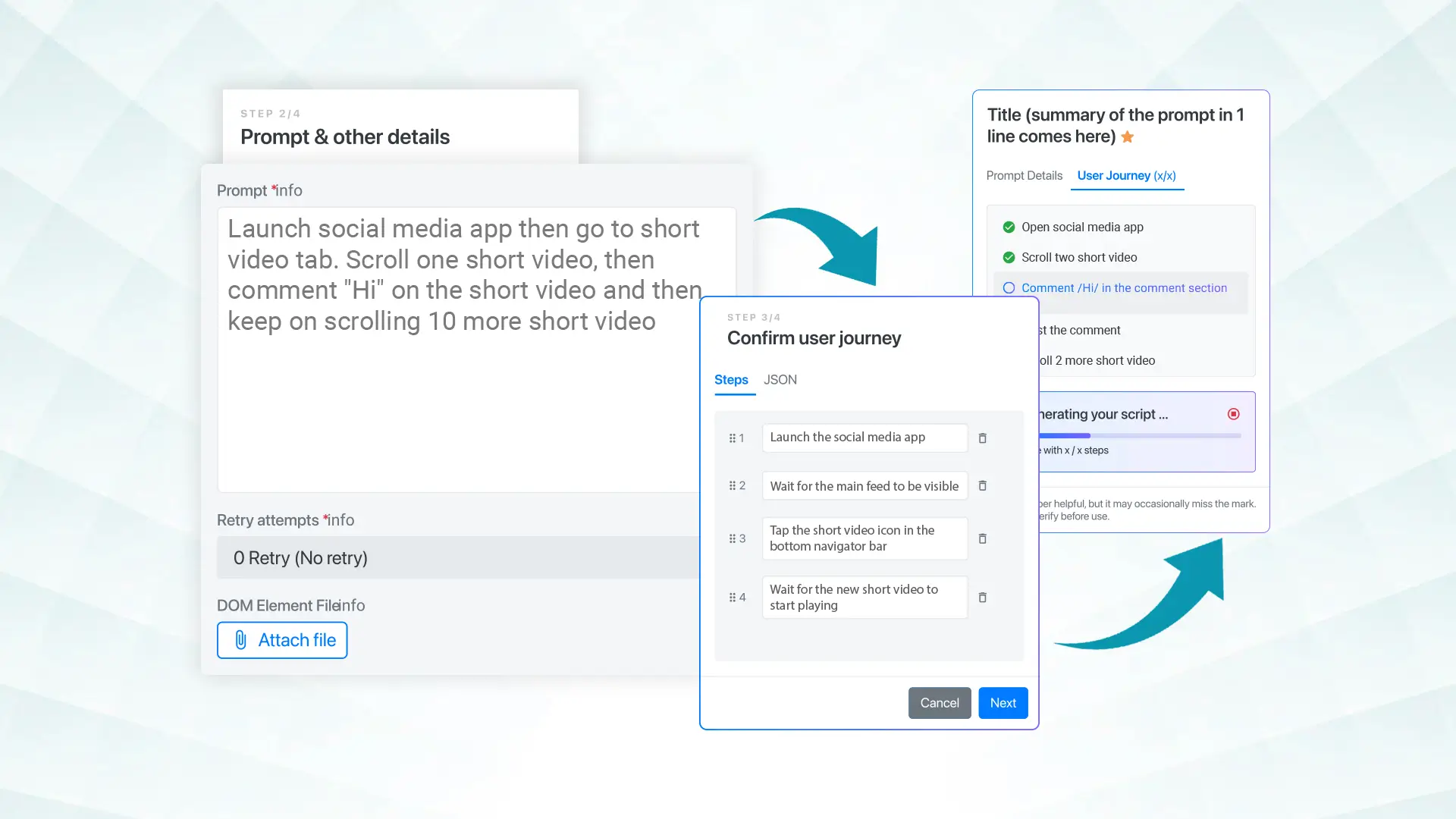
Instead of asking teams to manually write every test step, ACE lets them describe what they want to test. It then builds the test flow, uses the live application structure to generate automation, executes the steps, and validates the journey as it moves forward.
ACE is designed around a simple idea: automation should be grounded in the real application, not guesswork.
Many AI tools can produce a script when prompted. The problem is that generated code may not understand the actual app state. It may assume elements exist. It may write steps that look right on paper but fail on a real device. ACE takes a more grounded approach by working with the live UI DOM/XML during execution.
That means the automation is based on what is actually present in the application at runtime.
ACE currently generates ready-to-run Python user journeys for Appium and Selenium workflows. It supports mobile app and browser testing across iOS, Android, and desktop browsers, and connects automation execution with HeadSpin’s real-device infrastructure and performance visibility.
For QA teams, this changes the workflow from:
Write script → debug locators → run test → fix breakage → repeat
to:
Describe scenario → generate journey → execute → validate → auto-heal when needed
Also read - Why Do Businesses Need Test Automation?
How ACE Works: From Prompt to Validated Execution
ACE follows a closed-loop test automation flow. Each stage is designed to reduce manual scripting effort while keeping the tester in control.
1. Describe the Test Scenario
The process starts with a plain-English prompt.
A QA engineer, tester, or developer can describe the journey they want to automate. For example:
“Open the app, log in with valid credentials, search for wireless headphones, add the first product to the cart, and verify that the cart updates.”
The user does not need to start by writing Appium or Selenium code manually. ACE interprets the intent and converts it into a structured test journey.
This is one of the biggest practical benefits of generative AI testing. It helps teams turn human understanding into automation faster.
2. Generate the Test Flow
After reading the prompt, ACE breaks the scenario into executable steps.
Instead of treating the prompt as a vague instruction, it creates a journey the team can review and refine. This keeps the process transparent. Testers are not handing control to a black box. They can see how the test is being interpreted before execution moves forward.
That matters for enterprise QA teams because test automation needs to be auditable. Teams should understand what the AI is doing, why it is doing it, and how each step maps to the expected user flow.
3. Capture the Live UI DOM/XML
ACE works with the live application structure during execution.
For each step, the current UI DOM/XML is captured and used to understand what is present on the screen. This gives the system runtime context before it generates or executes the next action.
This is important because application screens change after every interaction. A login button leads to a home screen. A search field leads to results. A checkout action leads to payment confirmation. ACE does not rely on a static view of the app captured at the beginning. It works step by step, using the current state of the interface.
That makes the generated automation more aligned with the actual application.
4. Generate Executable Automation
ACE generates executable Python user journeys for Appium and Selenium frameworks.
For engineering teams, this is a major difference from low-code or purely proprietary automation tools. The output is not just an abstract instruction stored inside a closed system. ACE generates automation that teams can inspect, use, and build into their testing workflow.
This gives teams the speed of AI-assisted creation without taking away technical visibility.
5. Execute on Real Devices and Browsers
Once the journey is generated, ACE executes it across HeadSpin’s real-device and browser environments.
This is where the value goes beyond script generation. A test that works in theory still needs to run against real devices, real browsers, and real-world conditions. ACE connects test creation with execution, so teams can validate whether the journey actually works in practice.
For mobile teams, this helps validate app behavior across iOS and Android devices. For web teams, it supports browser-based journeys through Selenium. For enterprises, it helps connect automation with the broader HeadSpin platform, including performance and experience visibility.
6. Validate Each Step
ACE validates the journey step by step.
This is critical because execution alone is not enough. A test tool can click through an app and still miss whether the journey is behaving correctly. ACE is built to make the process visible and validated before moving forward.
Teams can track what is being executed, inspect how the journey progresses, and review the output. This reduces the uncertainty that often comes with AI-generated automation.
The result is not just faster test creation. It is more accountable automation.
Also read - Selenium Testing: A Step-by-Step Tutorial
What Makes ACE Different from Basic AI Script Generation?
Basic AI script generation usually starts and ends with code.
You ask for a script. The system writes something that looks plausible. Then your team has to test it, debug it, adjust locators, fix framework issues, and make it work inside the real application environment.
ACE takes a more complete approach.
It does not just generate automation from a prompt. It uses the live DOM/XML to understand the application, generates executable steps, runs them, validates progress, and self-corrects when certain failures occur.
That gives ACE three clear advantages.
ACE Executes
ACE is not limited to producing suggestions. It executes the generated journey across real devices and browsers through HeadSpin.
This matters because QA teams do not need more theoretical scripts. They need automation that runs.
ACE Validates
ACE gives teams visibility into the journey as it executes. Each step is traceable, and teams can understand how the automation is progressing.
This helps QA teams trust the output and review the journey before scaling it across regression workflows.
ACE Self-Heals
ACE includes auto-heal behavior that helps recover from common UI-related failures.
When a step fails because of a locator change, unexpected screen, or UI shift, ACE can analyze the current screen and attempt to self-correct up to the configured retry limit. By keeping the recovery process within defined limits, ACE prevents infinite loops and ensures the entire journey remains reviewable.
Conclusion
AI in testing is only valuable when it moves beyond suggestions.
QA teams do not need another tool that writes a few lines of code and leaves the hard work to engineers. They need automation that understands intent, works with the real application, executes on real environments, validates progress, and adapts when common UI changes occur.
That is what ACE by HeadSpin brings to modern QA.
ACE turns plain-English scenarios into executable Python user journeys for Appium and Selenium, runs them across real devices and browsers, validates each step, and supports self-healing test automation through live DOM/XML context.
It helps teams create automation faster, reduce maintenance effort, improve visibility, and scale test coverage across mobile and web experiences.
In a market full of AI software testing tools, ACE stands out because it is built around execution.
- Not just prompts.
- Not just suggestions.
- Not just code.
- ACE executes, validates, and self-heals.
FAQs
Q1. Is ACE useful for manual QA teams?
Ans: Yes. ACE helps manual QA teams move faster into automation by allowing them to describe test journeys in plain English. Automation engineers can then review, refine, and use the generated journeys.
Q2. Why is ACE different from generic AI software testing tools?
Ans: Generic AI tools may generate code, but ACE connects prompt-based generation with live application context, real-device execution, step-by-step validation, and self-healing. This makes it more practical for production QA workflows.
Q3. Can ACE help reduce test maintenance?
Ans: Yes. ACE can help reduce repetitive script maintenance by using live DOM/XML context and auto-heal behavior when application UI changes would normally break a test step.
Q4. Is ACE only for mobile testing?
Ans: No. ACE supports mobile app and browser testing workflows, including iOS, Android, and desktop browser environments through supported Appium and Selenium journeys.








-1280X720-Final-2.jpg)




