


.png)


.png)



AI-Powered Key Takeaways


Table of Contents

Mobile apps are no longer side products of desktop platforms. For many businesses, they are the primary way users interact with services. This shift has changed expectations. Users now expect apps to load quickly, respond instantly, and work reliably across devices and networks.
A delay of even a few seconds can lead to drop-offs, negative reviews, or lost revenue. This is where performance testing becomes essential. It helps teams understand how an app behaves in real conditions before users experience issues.
This guide explains how mobile app performance testing works, what to measure, and how to approach it step by step.
What is Mobile App Performance Testing?
Mobile app performance testing checks how an app behaves under real usage conditions. It focuses on whether the app remains responsive, stable, and efficient when users interact with it across different devices, networks, and workloads.
The goal is to identify performance issues before they reach users.
This includes evaluating how the app performs when multiple users are active at the same time, when network conditions change, and when it runs on devices with different capabilities. It also looks at how the app handles backend dependencies such as APIs and servers, especially under load.
At the same time, performance testing measures how efficiently the app uses device resources like CPU, memory, battery, and network data. Poor resource usage can slow down the app or impact overall device performance.
In simple terms, it ensures the app not only works, but continues to work smoothly when real users start relying on it.
Why Mobile App Performance Testing is Important
1. Device diversity
Mobile apps run across a wide range of devices with different hardware capabilities, screen sizes, and OS versions. An app that works well on a high-end device may lag or crash on a mid-range one. Performance testing helps ensure consistent behavior across this fragmented ecosystem, reducing the risk of device-specific failures.
2. Network variability
Users interact with apps on different network conditions, from stable Wi-Fi to congested mobile networks. High latency, packet loss, or low bandwidth can delay API calls and content loading. Testing across these conditions helps ensure the app remains usable and responsive even when connectivity is poor.
3. User expectations
Users expect apps to respond instantly. Delays in loading screens, lag in interactions, or slow transitions can quickly lead to frustration. Performance testing helps identify these delays and optimize critical user flows so the app feels smooth and reliable.
4. Early issue detection
Issues like memory leaks, inefficient API calls, excessive background processing, or heavy UI rendering often do not appear in functional testing. Performance testing exposes these problems early, allowing teams to fix them before they impact users or become harder to debug.
5. Continuous updates
Mobile apps are updated frequently with new features and fixes. Each update can affect performance in unexpected ways. Regular performance testing helps detect regressions and ensures that improvements in one area do not degrade performance in another.
6. Business impact
For apps in banking, e-commerce, or media, performance directly influences user actions. Slow checkout flows can lead to abandoned transactions, delayed video playback can increase drop-offs, and app crashes can reduce trust. Performance testing helps protect these critical user journeys and supports overall business goals.
Also read: Mobile App Testing: Definition, Types, and Tools (2026)
6 Types of Mobile App Performance Testing
1. Load testing
In load testing, performance is observed under expected traffic levels. The focus stays on whether everyday user journeys continue smoothly when the system is actively serving multiple users at once, without response times creeping up or backend services starting to fail.
2. Stress testing
With stress testing, the system is deliberately pushed beyond its limits. This brings out the exact point where performance starts to break, whether requests begin to queue up, APIs time out, or the system stops responding altogether, along with how it behaves during failure.
3. Endurance testing
Endurance testing keeps the app running for extended periods to expose issues that develop slowly. Over time, memory consumption may increase, background processes may accumulate, and response times may degrade, even if short test runs show no visible problems.
4. Spike testing
During spike testing, traffic increases sharply within a short time instead of growing gradually. This makes it easier to observe how quickly the system absorbs the sudden load, whether it drops requests, and how long it takes to return to stable performance.
5. Scalability testing
Scalability testing tracks how the system handles steady growth in users, data, or transactions. It highlights whether performance remains consistent as demand increases or if certain components start becoming bottlenecks under higher load.
6. Network testing
In network testing, the app is evaluated across different connectivity conditions, including low bandwidth, high latency, and unstable networks. This reveals how delays in data transfer, retries, or dropped connections affect the overall user experience.
Learn more about the differences between load testing and stress testing in our detailed comparison guide.
Key Mobile App Performance Testing Metrics
Mobile App Performance testing depends on measurable indicators. These metrics reflect how the app behaves under real usage and where the experience starts to break.
1. Response time
Response time reflects how quickly the app reacts after a user action. It includes processing on the device, communication with backend services, and rendering on screen, making it one of the most visible indicators of performance.
2. App start-up time
App start-up time captures how long it takes for the app to move from launch to a usable state. This includes initialization, loading dependencies, establishing network connections, and rendering the first screen.
3. API latency
API latency represents the delay between sending a request and receiving a response from the server. Since most app interactions depend on APIs, even small delays here can affect entire user flows.
4. Throughput
Throughput indicates how much data or how many requests the system can handle within a given time. It helps assess whether the backend can keep up as user activity increases.
5. Crash rate
Crash rate measures how often the app fails during usage. It highlights stability issues caused by unhandled exceptions, resource limits, or device-specific problems.
6. Memory usage
Memory usage tracks how much RAM the app consumes while running. Inefficient memory handling can lead to slowdowns, background termination, or crashes, especially on lower-end devices.
7. Battery consumption
Battery consumption shows how much power the app uses during operation. Continuous background activity, frequent network calls, or heavy processing can increase drain and affect usability.
8. Time to First Byte (TTFB)
Time to First Byte measures how quickly the server begins responding after a request is made. It gives an early signal of backend responsiveness before full data transfer completes.
9. Load time
Load time captures how long it takes for content to fully appear and become interactive. It combines backend response, data processing, and UI rendering, directly shaping user perception of speed.
Mobile App Performance Testing Architecture
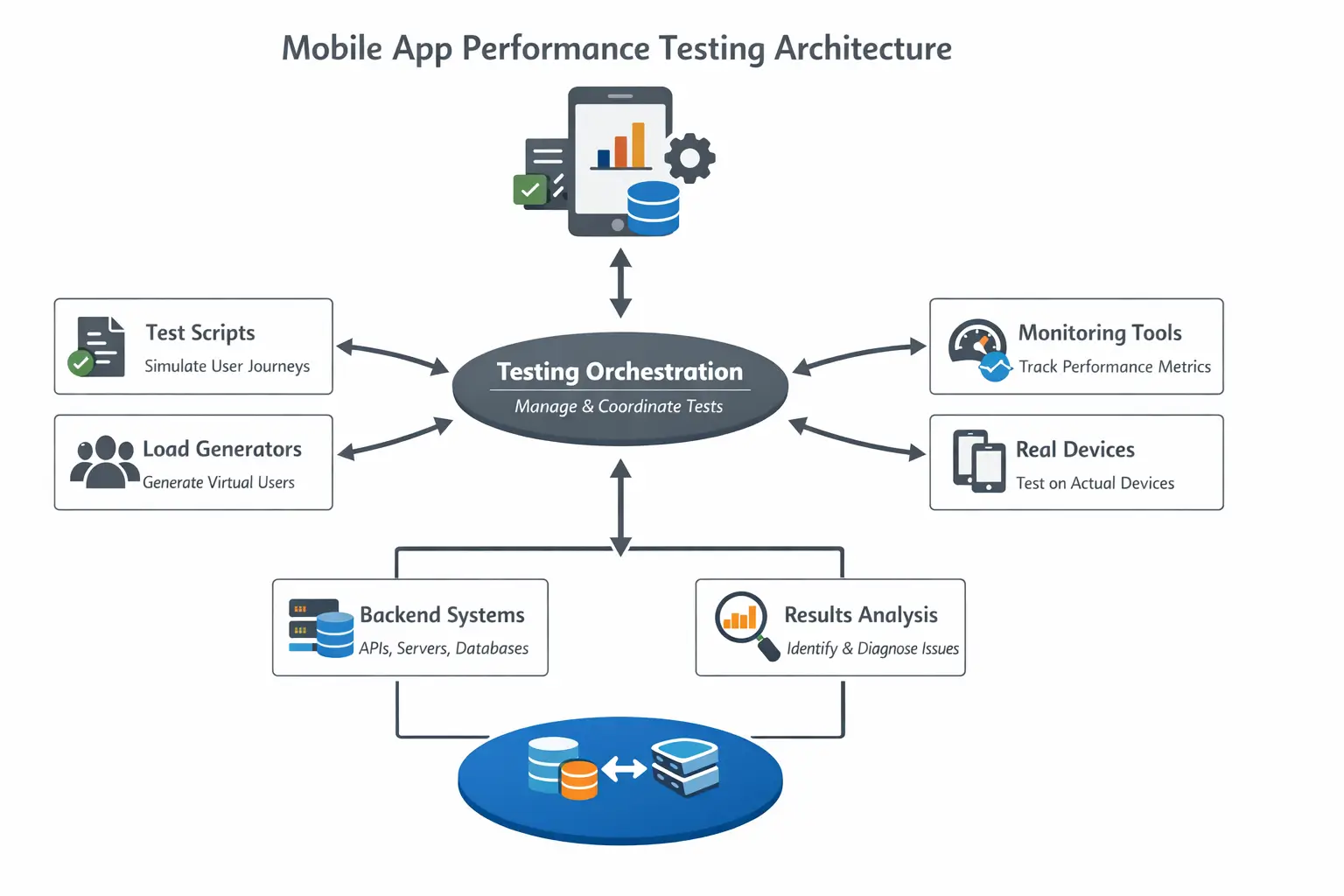
- Test scripts
Test scripts represent actual user journeys, not isolated actions. Flows such as login, product search, checkout, or video playback are defined step by step so performance can be measured across complete user experiences, not just individual screens. - Load generators
Load generators create controlled traffic that reflects real usage patterns. Instead of just simulating volume, they help reproduce scenarios like concurrent logins, repeated API calls, or peak-hour activity to see how the system behaves under pressure. - Monitoring tools
Monitoring tools capture what is happening during the test across layers. This includes device-level metrics such as CPU and memory, network-level signals like latency and request failures, and backend metrics such as API response times and error rates. - Backend systems
Backend systems include APIs, servers, and databases that process requests from the app. Performance testing here focuses on how these systems handle concurrency, manage data, and respond when traffic increases or dependencies slow down. - Real devices
Real devices are where the actual experience is validated. Differences in hardware, OS versions, and device conditions affect rendering, memory usage, and network handling, which often cannot be reproduced accurately in emulators.
How to Perform Mobile App Performance Testing
1. Define goals and benchmarks
Start with clear numbers. For example, app launch under 2 seconds, API latency under 300 ms, crash rate below 1 percent. These become the baseline to judge whether performance is acceptable or not.
2. Identify target devices and environments
Use analytics data to shortlist devices, OS versions, and regions. Include a mix of high-end and low-end devices, along with different network conditions like Wi-Fi and weak mobile data.
3. Design test scenarios
Pick real user flows and write them step by step. Focus on critical journeys such as login, search, checkout, or content playback. Each step should be measurable so delays can be tracked across the flow.
4. Set up tools and environment
Use load tools to simulate traffic, real devices to validate user experience, and monitoring tools to capture metrics. Keep the setup simple and aligned with what needs to be tested.
5. Execute tests in stages
Start with a small number of users and increase gradually. Run the same scenarios across different devices and network conditions. Track response times, failures, and resource usage during each run.
6. Analyze where performance breaks
Do not just look at averages. Identify where delays begin. Slow APIs point to backend issues, slow screens to rendering or device limits, and failures under load to scaling problems.
7. Fix issues and retest
Address one issue at a time, whether in APIs, app code, or infrastructure. Run the same tests again under the same conditions to confirm that performance has improved.
5 Best Mobile App Performance Testing Tools
Different tools address different layers of performance testing, from real device validation to backend load simulation. Most teams combine multiple tools based on what they need to measure.
1. HeadSpin
HeadSpin provides end-to-end mobile app performance testing across real devices, networks, and backend systems, with deep visibility into user experience.
Key features:
- Real device infrastructure across multiple geographies
- Performance monitoring across device, network, and API layers
- AI-driven insights for identifying performance anomalies
- Support for testing under real network conditions
- Regression tracking across builds, devices, and OS versions
- Integration with CI/CD pipelines for continuous testing
- Custom dashboards for tracking QoE and performance metrics
Ideal for:
Teams that need real-world performance validation across devices, networks, and locations, with clear visibility into root causes.
2. Appium
Appium is widely used for automating mobile app workflows across platforms, often forming the base for performance-related test execution.
Key features:
- Cross-platform automation for iOS and Android using a single framework
- Support for multiple programming languages such as Java, Python, and JavaScript
- Reusable test scripts across devices and environments
Ideal for:
Teams building automated test flows that can be extended to measure performance across user journeys.
3. LoadRunner
LoadRunner focuses on backend and system-level performance by simulating large volumes of user traffic.
Key features:
- High-scale load simulation to mimic thousands of concurrent users
- Detailed reporting on response times, throughput, and error rates
- Support for multiple protocols and backend systems
Ideal for:
Teams looking to understand how backend systems behave under heavy traffic and where scaling limits exist.
4. Tricentis NeoLoad
NeoLoad is designed for enterprise performance testing with a focus on continuous testing and fast feedback cycles.
Key features:
- Automated load testing for APIs and applications
- Real-time monitoring and performance analysis
- CI/CD integration for continuous performance testing
Ideal for:
Teams running performance tests as part of continuous delivery pipelines and needing quick feedback on system behavior.
5. MonkeyRunner
MonkeyRunner is an Android-focused tool used for scripting and running repetitive test actions.
Key features:
- Script-based automation for Android applications
- Ability to simulate user actions such as clicks and gestures
- Useful for repetitive and regression test scenarios
Ideal for:
Teams focused on Android testing that need simple, script-driven automation for repeated workflows.
Common Challenges in Mobile App Performance Testing
Performance testing is not straightforward. Teams often face these issues:
- Device fragmentation makes it difficult to ensure consistent performance across varying hardware, screen sizes, and OS versions, especially on lower-end devices.
- Network unpredictability makes it hard to replicate real-world conditions like latency, packet loss, and bandwidth fluctuations that directly impact app behavior.
- Limited visibility across layers makes it difficult to pinpoint whether a performance issue originates from the app code, network conditions, or backend systems.
- Simulating real user behavior at scale is challenging, as scripted flows often fail to capture how users actually interact with the app under different conditions.
- Root cause analysis becomes complex without detailed, correlated data, making it difficult to trace performance issues back to specific components or failure points.
Best Practices for Mobile App Performance Testing
Adopting the right practices helps ensure results reflect real usage and lead to meaningful improvements.
- Test on real devices to capture how the app behaves across different hardware capabilities, OS versions, and device conditions that emulators cannot fully replicate.
Include network simulation to evaluate performance under varying conditions such as low bandwidth, high latency, and unstable connectivity, where most user-facing issues appear. - Start performance testing early in the development cycle so issues related to APIs, rendering, or resource usage are identified before they become harder to fix.
- Track performance continuously across builds and releases to detect regressions introduced by new features, updates, or infrastructure changes.
- Focus on complete user journeys such as login, checkout, or content playback to understand how performance behaves across end-to-end interactions rather than isolated actions.
- Automate repeatable test flows to maintain consistency, reduce manual effort, and ensure the same scenarios can be executed across devices, networks, and builds.
Also Read - 15 Test Automation Best Practices for Successful Automation Testing
How HeadSpin Helps with Mobile App Performance Testing
HeadSpin helps teams validate mobile app performance under real user conditions using real devices, real networks, and visibility across the test results.
- Tests run on real devices across geographies, making it easier to observe how device limitations, network conditions, and location impact app behavior.
- Performance data is captured across device, network, and backend layers, linking user actions to API calls, network delays, and screen rendering.
- Session-level analysis highlights anomalies and recurring patterns, helping teams identify performance issues without manually reviewing logs.
- Teams can compare performance across builds, OS versions, and releases to detect regressions early.
- Network and API visibility helps isolate delays, whether they originate from backend responses, network latency, or device-side processing.
- Tests can be integrated into CI/CD pipelines, and dashboards can be configured to track performance trends over time.
Conclusion
Mobile app performance testing is not a one-time activity. It is an ongoing process that evolves with the app.
A structured approach, combined with the right tools and real-world testing conditions, helps teams deliver reliable and consistent user experiences.
Apps that perform well retain users, reduce support issues, and support business growth.
Identify how your app behaves across real networks, carriers, and locations before it impacts users. Connect with HeadSpin Experts!
FAQs
Q1. What role does cache management play in app performance?
Ans: Cache management reduces load times and minimizes repeated server requests, improving overall efficiency.
Q2. Why is memory leak testing important?
Ans: Memory leaks can cause slowdowns and crashes over time. Detecting them early prevents long-term performance issues.
Q3. Should performance testing be done only before release?
Ans: No. It should be part of continuous testing to catch issues introduced by updates.
Q4. Are real devices necessary for testing?\
Ans: Yes. Real devices provide more accurate insights compared to emulators, especially for network and hardware-related behavior.








-1280X720-Final-2.jpg)




