


.png)


.png)



AI-Powered Key Takeaways


Table of Contents

Introduction
Modern applications rely heavily on location data to deliver accurate services and personalized user experiences. A small issue in location detection can cause problems such as incorrect content delivery, failed transactions, inaccurate search results, or restricted feature access.
That is why many engineering and QA teams now prioritize geolocation testing.
Geolocation testing helps teams verify whether applications correctly detect, process, and respond to user locations across different devices, networks, and regions. It also helps identify issues related to GPS accuracy, IP-based location detection, permission handling, VPN usage, and region-specific application behavior.
This guide explains how geolocation testing works, different testing approaches, common challenges, and how teams can validate location-based functionality across real-world conditions.
What is Geolocation Testing?
Geolocation testing is the process of verifying whether an application correctly detects and responds to a user’s geographic location. It helps teams validate location-based functionality across different regions, devices, networks, and operating systems.
Many web and mobile applications use geolocation data to deliver personalized content, enable region-specific services, calculate distances, display local pricing, or enforce geographic restrictions. Geolocation testing ensures these features work accurately under real-world conditions.
Geolocation app testing is commonly used for:
- Location-based search results
- Navigation and ride-hailing features
- Delivery availability checks
- Regional content and language targeting
- Geo-blocking and compliance validation
- Fraud detection and transaction verification
- Local advertisements and recommendations
Also read - Mobile App Security Testing: What It Is and How to Perform
Why Geolocation Testing Matters
Geolocation testing helps teams validate multiple aspects of location-aware application behavior, including location accuracy, region-specific functionality, compliance workflows, and real-world network conditions. The following areas explain why geolocation testing has become important for modern web and mobile applications.
1. Ensures Accurate Location-Based Functionality
Many applications depend on location data to deliver core functionality. A small issue in location detection can result in incorrect pricing, unavailable services, failed transactions, inaccurate recommendations, or restricted access to features that should normally work.
Geolocation testing helps teams verify whether applications behave correctly across different regions, devices, and network conditions before release.
2. Validates Region-Specific User Experiences
Application behavior often changes depending on the user’s geographic location. E-commerce platforms may display region-specific pricing, streaming platforms may restrict content access, and ride-hailing apps may enable services only within supported locations.
Testing geolocation behavior helps ensure these location-aware experiences remain accurate and consistent for users across different regions.
3. Supports Compliance and Security Requirements
Many applications use location data to enforce regional regulations and security policies. Streaming services validate geo-restricted content access, while fintech applications may trigger additional verification when login activity appears suspicious or originates from unexpected locations.
Geolocation testing helps teams validate these workflows and reduce the risk of compliance failures or incorrect security actions.
4. Identifies Real-World Location Handling Issues
Location behavior can vary depending on GPS accuracy, VPN usage, network switching, operating system permissions, carrier networks, and device-specific configurations.
Geolocation testing helps teams identify these inconsistencies early and validate how applications behave under real-world conditions before they affect production users.
Also read - How to Effectively Test GPS Geolocation and IP Geolocation
How Geolocation Testing Works
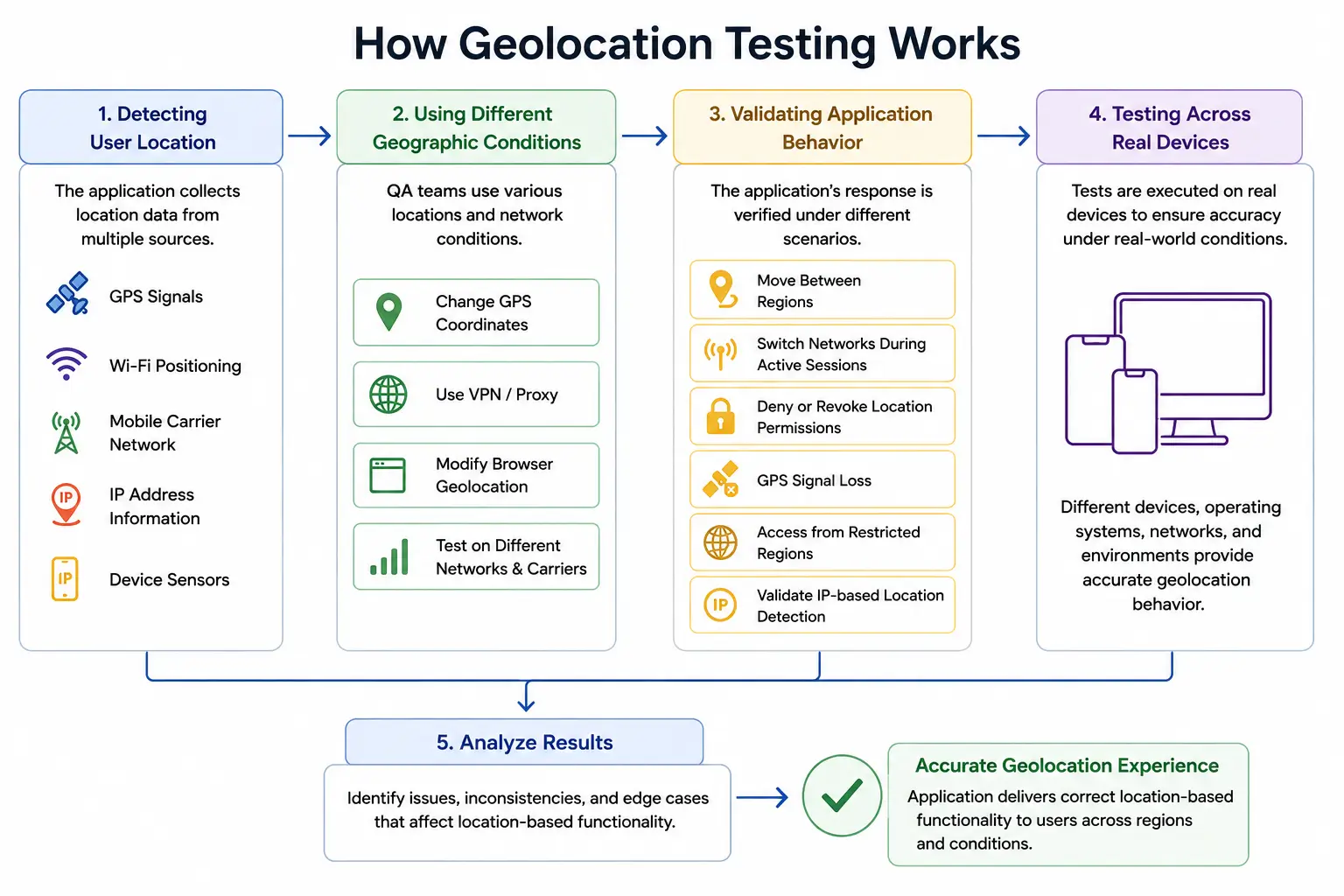
1. Detecting User Location
Applications determine user location using multiple data sources such as GPS signals, IP addresses, Wi-Fi positioning, carrier networks, and device sensors. The application then uses this information to deliver location-aware functionality.
This may include navigation services, nearby search results, regional content delivery, localized pricing, fraud detection, or geo-restricted access.
2. Simulating Different Geographic Conditions
During testing, QA teams simulate different locations and network conditions to verify whether the application responds accurately across regions.
This may involve changing GPS coordinates, using VPNs, modifying browser geolocation settings, or testing across different mobile carriers and network environments.
3. Validating Application Behavior
Geolocation testing validates how applications behave when users move between regions, switch networks during active sessions, deny location permissions, lose GPS connectivity, or access services from restricted geographic locations. It also helps teams verify whether IP-based location detection works accurately under different network conditions.
These scenarios help QA teams identify inconsistencies that may affect application behavior in real-world usage environments.
4. Testing Across Real Devices
Although emulators and browser tools can simulate location changes, they often fail to replicate real-world GPS behavior and carrier network conditions accurately.
Real-device testing helps teams validate how location services behave across actual hardware, operating systems, mobile networks, and environmental conditions.
Geolocation Testing vs Localization Testing
Geolocation testing checks whether the application responds correctly to where the user is located, while localization testing ensures the application experience is properly adapted for users from different regions and languages.
Read our related guide on - How to Perform Localization Testing on Websites and Apps
Types of Geolocation Testing
Applications use location data in different ways depending on their functionality, users, and business requirements. Because of this, geolocation testing is usually performed across multiple scenarios to validate how mov.
1. GPS-Based Geolocation Testing
GPS-based testing verifies whether applications correctly detect and process location data received from device GPS sensors. This type of testing is commonly used in ride-hailing apps, navigation systems, delivery platforms, and fitness applications.
Teams validate whether the application accurately tracks user movement, updates routes correctly, and maintains stable functionality when GPS signals fluctuate or become unavailable.
2. IP-Based Geolocation Testing
IP-based geolocation testing checks whether applications correctly identify user regions using IP addresses. Many websites and streaming platforms rely on IP detection to display region-specific content, pricing, advertisements, or access restrictions.
Testing helps verify whether the application responds correctly when users access services from different countries, use VPNs, or switch between networks.
3. Browser Geolocation Testing
Modern browsers allow websites to request user location access through browser-level geolocation APIs. Browser geolocation testing validates whether location permissions, prompts, and location-based functionality work correctly across browsers such as Chrome, Firefox, Safari, and Edge.
This type of testing is important for web applications that depend on nearby search results, maps, or localized recommendations.
4. Network-Based Geolocation Testing
Some applications estimate location using Wi-Fi positioning, mobile carrier networks, or network signals instead of GPS alone. Network-based geolocation testing helps teams validate how applications behave when network conditions change or when users move across different carrier environments.
This testing is especially important for applications used in low-connectivity or high-mobility environments.
5. Geo-Restriction Testing
Geo-restriction testing validates whether applications correctly allow or block access based on geographic regions. Streaming platforms, fintech applications, gaming services, and regulated platforms often use geo-restrictions to comply with regional licensing or legal requirements.
Testing helps ensure users from unsupported regions cannot access restricted functionality while legitimate users continue to receive proper access.
6. Real-Time Location Change Testing
Some applications must respond dynamically when users move between locations during active sessions. Real-time location change testing validates whether the application updates content, services, or permissions correctly as the user’s geographic location changes.
Also read - Mobile Network Testing for Different Real-World Conditions
Common Geolocation Testing Use Cases
Geolocation testing is used across industries where application behavior changes based on the user’s location. It helps teams validate whether location-aware functionality works accurately under different geographic and network conditions.
1. Food Delivery and Ride-Hailing Applications
Food delivery and ride-hailing platforms depend heavily on real-time location data. Geolocation testing helps verify whether applications correctly detect pickup and delivery locations, calculate routes accurately, and display nearby drivers or restaurants based on the user’s current location.
Testing also validates how applications behave when users move during active sessions or experience weak GPS connectivity.
2. Banking and Fintech Applications
Banking and fintech platforms use geolocation data for fraud detection, transaction validation, and compliance requirements. Applications may flag suspicious login attempts, block transactions from unsupported regions, or trigger additional authentication based on geographic activity.
Geolocation testing helps teams verify whether these security workflows function correctly without affecting legitimate users.
3. Streaming and Media Platforms
Streaming services often apply geo-restrictions because of licensing agreements and regional content regulations. Geolocation testing validates whether users can access content only in supported regions and whether restricted content remains blocked in unsupported countries.
Testing also helps identify inconsistencies caused by VPNs, proxy networks, or incorrect IP-based location detection.
4. E-Commerce Applications
E-commerce platforms use geolocation data to display localized pricing, shipping availability, taxes, promotions, and nearby store information. Geolocation testing helps ensure users receive accurate product availability and region-specific experiences based on their location.
It also helps validate checkout workflows that depend on regional compliance or delivery restrictions.
5. Navigation and Mapping Applications
Navigation and mapping applications rely on accurate real-time location tracking to deliver directions, traffic updates, and nearby search results. Geolocation testing validates route calculations, movement tracking, GPS stability, and location refresh behavior across different environments and network conditions.
6. Travel and Hospitality Platforms
Travel applications use geolocation services for hotel discovery, airport services, local recommendations, and booking experiences tailored to the user’s location. Testing helps ensure location-based recommendations remain accurate across regions and devices.
7. Gaming Applications
Many gaming platforms use geolocation for regional matchmaking, location-based gameplay, event availability, and compliance enforcement. Geolocation testing helps validate whether players receive the correct regional experience and whether location-based restrictions work as expected.
Also read - OTT Testing Guide: Types, Checklist, KPIs & Best Practices
Challenges in Geolocation Testing
1. Inconsistent GPS Accuracy
GPS accuracy can vary depending on device hardware, environmental conditions, signal strength, and operating system behavior. Applications may receive delayed or inaccurate location updates when users are indoors, traveling through low-signal areas, or using devices with weak GPS performance.
These inconsistencies can affect navigation accuracy, nearby search results, delivery tracking, and other location-dependent functionality.
2. Differences Between Real Devices and Emulators
Emulators and simulators can validate basic geolocation workflows, but they often fail to replicate real-world GPS behavior, carrier network fluctuations, and hardware-level location handling accurately.
Applications that work correctly in virtual environments may still experience location-related issues on actual devices under real network conditions.
3. VPN and Proxy Network Interference
Many applications use IP-based geolocation to determine user regions. VPNs and proxy services can mask the user’s actual location, making it difficult to validate region-specific functionality accurately.
This creates challenges when testing geo-restricted content, localized pricing, fraud detection systems, and regional access controls.
4. Network Switching and Connectivity Issues
Mobile users frequently move between Wi-Fi, 4G, and 5G networks during active sessions. These transitions can affect how applications process location updates and maintain session continuity.
Geolocation testing must validate whether the application continues functioning correctly when network conditions change unexpectedly.
5. Operating System Permission Handling
Modern operating systems provide strict controls over location access permissions. Applications must handle scenarios where users deny, revoke, or partially allow location access.
Testing these permission workflows across Android, iOS, and browsers can become complex because permission behavior differs across platforms and OS versions.
6. Regional Compliance and Geo-Restrictions
Applications operating across multiple countries often enforce region-specific restrictions because of licensing agreements, privacy regulations, or compliance requirements.
Testing these restrictions accurately requires validating application behavior across multiple geographic regions, networks, and user conditions.
7. Managing Large-Scale Geographic Coverage
Applications serving global users must be tested across many countries, cities, carriers, devices, and operating systems. Building and maintaining this level of geographic test coverage can become resource-intensive without access to scalable testing infrastructure.
How to Perform Geolocation Testing
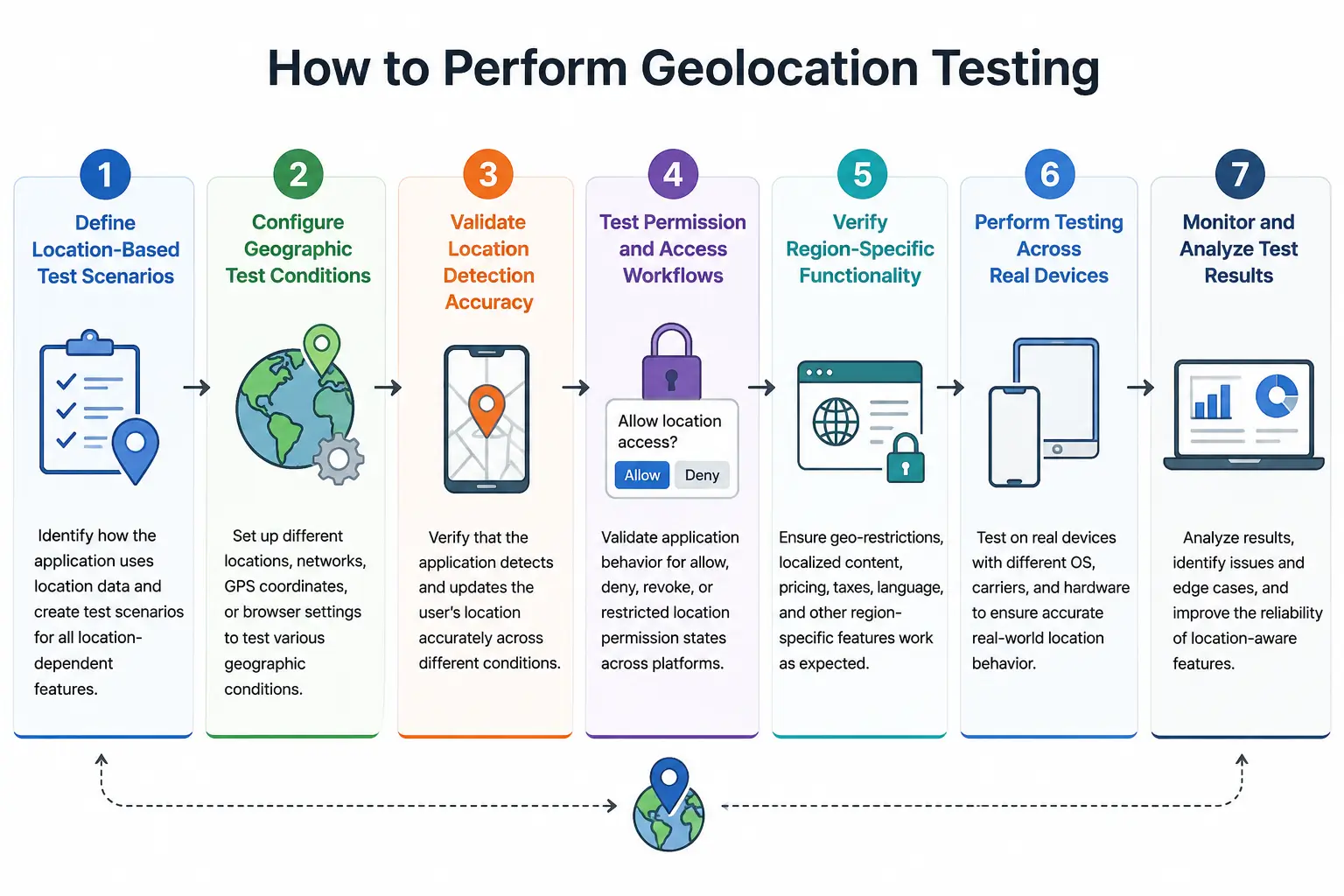
Step 1: Define Location-Based Test Scenarios
The first step in geolocation testing is identifying how the application uses location data. Teams should define test scenarios based on features such as nearby search results, navigation, localized pricing, geo-restricted content, fraud detection, or region-specific workflows.
Clear test coverage helps ensure all critical location-dependent functionality is validated across different environments.
Step 2: Configure Geographic Test Conditions
Once the test scenarios are defined, teams configure the required geographic conditions for testing. This may involve changing GPS coordinates, routing traffic through different networks, modifying browser geolocation settings, or testing from multiple regions.
The goal is to verify how the application behaves when accessed under different geographic and network conditions.
Step 3: Validate Location Detection Accuracy
Testing should verify whether the application correctly detects and processes the user’s location. Teams validate whether location updates remain accurate during movement, network changes, GPS fluctuations, or permission changes.
This step helps identify inconsistencies that may affect navigation accuracy, nearby recommendations, delivery tracking, or region-specific functionality.
Step 4: Test Permission and Access Workflows
Applications must handle different permission states correctly across browsers and mobile operating systems. Geolocation testing should validate how the application behaves when users allow, deny, revoke, or partially grant location permissions.
Teams should also verify whether the application continues functioning properly when location access becomes unavailable during active sessions.
Step 5: Verify Region-Specific Functionality
Many applications change behavior depending on the user’s location. Testing should validate whether geo-restrictions, localized content, regional pricing, taxation rules, language settings, and location-aware services function correctly across supported regions.
This step is especially important for streaming platforms, fintech applications, e-commerce systems, and regulated services.
Step 6: Perform Testing Across Real Devices
Real-device testing helps validate location behavior under actual operating conditions. Different devices, operating systems, carrier networks, and hardware configurations can affect GPS accuracy and location handling.
Testing across real devices improves the reliability of geolocation validation and helps teams identify issues that may not appear in emulator-based environments.
Step 7: Monitor and Analyze Test Results
After execution, teams analyze test results to identify inconsistencies, failures, and edge cases affecting location-based functionality. Monitoring helps teams understand how the application behaves under different geographic conditions and improves the overall reliability of location-aware features.
How to Test Geolocation on Real Devices
Real-device testing provides more accurate validation because location services behave differently across actual hardware, operating systems, carrier networks, and environmental conditions. It helps teams identify issues that are difficult to reproduce in emulator-based testing environments.
Best Practices for Geolocation Testing
Effective geolocation testing requires more than validating basic location detection. Teams must account for real-world conditions such as changing networks, device-level GPS behavior, operating system restrictions, and regional access rules to ensure location-aware functionality remains reliable across environments.
- Test across real devices, operating systems, and carrier networks instead of relying only on emulators. Real devices provide more accurate validation for GPS behavior, signal fluctuations, and network-related location handling.
- Validate both GPS-based and IP-based location detection. Many applications use a combination of these methods to determine user location and deliver region-specific functionality.
- Test location permission workflows thoroughly across Android, iOS, and browsers. Applications should behave correctly when users allow, deny, revoke, or partially grant location access.
- Verify application behavior during network transitions such as switching between Wi-Fi, 4G, and 5G connections. Network changes can affect location tracking and session continuity.
- Test geo-restrictions and regional compliance workflows across supported and unsupported locations. This helps validate content restrictions, regional pricing, taxation logic, and access controls.
- Validate real-time location updates for applications that depend on continuous movement tracking, such as ride-hailing, navigation, logistics, and delivery platforms.
- Include edge-case testing scenarios involving weak GPS signals, indoor environments, VPN usage, proxy networks, unstable connectivity, and interrupted location services.
- Test location-aware functionality across different geographic regions to identify inconsistencies caused by regional infrastructure, carrier behavior, or network latency.
- Monitor performance metrics such as GPS response time, location update delays, route calculation accuracy, map rendering performance, and location API responsiveness during testing.
- Perform regression testing regularly after application updates, operating system changes, or third-party map and location service updates to ensure location functionality remains stable.
Top Geolocation Testing Tools
Different tools support geolocation testing in different ways. Some focus on browser-based location overrides, while others provide real-device testing, GPS manipulation, network condition testing, or geo-restriction validation.
The right tool depends on the type of application being tested, required geographic coverage, and the level of real-world accuracy needed during testing.
Why Real Device Clouds Improve Geolocation Accuracy
Geolocation behavior often changes depending on the device hardware, operating system, carrier network, GPS signal strength, and regional infrastructure. Because of this, testing only on emulators or browser-based tools may not accurately reflect how applications behave for real users.
Real device clouds help teams validate location-aware functionality under actual usage conditions by providing access to physical devices distributed across different regions and networks.
1. More Accurate GPS Validation
Real devices use actual GPS hardware and operating system-level location services. This helps teams validate how applications process real GPS signals, movement tracking, route updates, and location refresh behavior under realistic conditions.
Emulators often cannot reproduce these behaviors accurately.
2. Better Network and Carrier Testing
Location services are heavily influenced by carrier networks and connectivity conditions. Real device clouds allow teams to test applications across Wi-Fi, 4G, and 5G environments using actual carrier infrastructure.
This improves validation for scenarios involving network switching, unstable connectivity, and region-specific carrier behavior.
3. Realistic Permission and OS Behavior
Operating systems handle location permissions differently across devices and versions. Real device testing helps validate how applications behave when users allow, deny, revoke, or limit location access under real operating conditions.
This is especially important for validating background location services and permission-related workflows.
4. Improved Regional Testing Coverage
Applications serving global users must function consistently across different countries and regions. Real device clouds provide geographic testing coverage without requiring teams to maintain physical devices in every location.
This helps validate geo-restrictions, localized services, regional pricing, and location-aware functionality more efficiently.
5. Better Validation for Real-World Conditions
Real-world conditions such as weak GPS signals, indoor usage, network latency, VPN usage, and device movement can affect geolocation behavior significantly.
Testing on real devices helps teams identify issues that are difficult to reproduce in virtual environments and improves overall reliability before production releases.
Why Real Device Clouds Improve Geolocation Accuracy
Geolocation behavior often changes depending on the device hardware, operating system, carrier network, GPS signal strength, and regional infrastructure. =
Real device clouds help teams validate location-aware functionality under actual usage conditions by providing access to physical devices distributed across different regions and networks.
1. More Accurate GPS Validation
Real devices use actual GPS hardware and operating system-level location services. This helps teams validate how applications process real GPS signals, movement tracking, route updates, and location refresh behavior under realistic conditions.
Emulators often cannot reproduce these behaviors accurately.
2. Better Network and Carrier Testing
Location services are heavily influenced by carrier networks and connectivity conditions. Real device clouds allow teams to test applications across Wi-Fi, 4G, and 5G environments using actual carrier infrastructure.
This improves validation for scenarios involving network switching, unstable connectivity, and region-specific carrier behavior.
3. Realistic Permission and OS Behavior
Operating systems handle location permissions differently across devices and versions. Real device testing helps validate how applications behave when users allow, deny, revoke, or limit location access under real operating conditions.
This is especially important for validating background location services and permission-related workflows.
4. Improved Regional Testing Coverage
Applications serving global users must function consistently across different countries and regions. Real device clouds provide geographic testing coverage without requiring teams to maintain physical devices in every location.
This helps validate geo-restrictions, localized services, regional pricing, and location-aware functionality more efficiently.
5. Better Validation for Real-World Conditions
Real-world conditions such as weak GPS signals, indoor usage, network latency, VPN usage, and device movement can affect geolocation behavior significantly.
Testing on real devices helps teams identify issues that are difficult to reproduce in virtual environments and improves overall reliability before production releases.
How HeadSpin Simplifies Geolocation Testing
HeadSpin helps teams validate geolocation functionality across real devices, carrier networks, and geographic regions without maintaining complex in-house infrastructure.
Teams can test GPS behavior, browser geolocation, network transitions, geo-restricted functionality, and location-aware user experiences on real Android and iOS devices connected to actual carrier networks.
HeadSpin also provides visibility into performance metrics such as network behavior, API responsiveness, and map rendering during geolocation testing. This helps engineering and QA teams identify issues affecting location accuracy and user experience under real-world conditions.
Conclusion
Geolocation functionality has become a critical part of modern web and mobile applications. From navigation and delivery services to fintech security checks and geo-restricted content, many applications depend on accurate location detection to deliver reliable user experiences.
Geolocation testing helps teams verify whether applications behave correctly across different devices, networks, operating systems, and geographic regions. It also helps identify issues related to GPS accuracy, permission handling, network transitions, and regional access controls before they affect production users.
FAQs
Q1. Why is geolocation testing important?
Ans: Geolocation testing helps ensure location-aware features such as navigation, nearby search results, geo-restricted access, localized pricing, and fraud detection work accurately under real-world conditions.
Q2. Can geolocation testing be performed using emulators?
Ans: Yes, emulators and browser tools can perform basic geolocation validation. However, they may not accurately reproduce real-world GPS behavior, carrier network conditions, or device-level location handling.
Q3. Why are real devices important for geolocation testing?
Ans: Real devices provide more accurate validation for GPS accuracy, network transitions, operating system permissions, and real-world location behavior across different hardware and carrier networks.
Q4. Which industries commonly use geolocation testing?
Ans: Industries such as fintech, e-commerce, travel, logistics, ride-hailing, gaming, media streaming, and food delivery commonly use geolocation testing to validate location-aware functionality.







-1280X720-Final-2.jpg)



